
Organising & due diligence
Extract fields from working papers in bulk and trace them back, file materials against the request list, and complete topic checks such as corporate history.
Organise fields and trace them back to the working papers
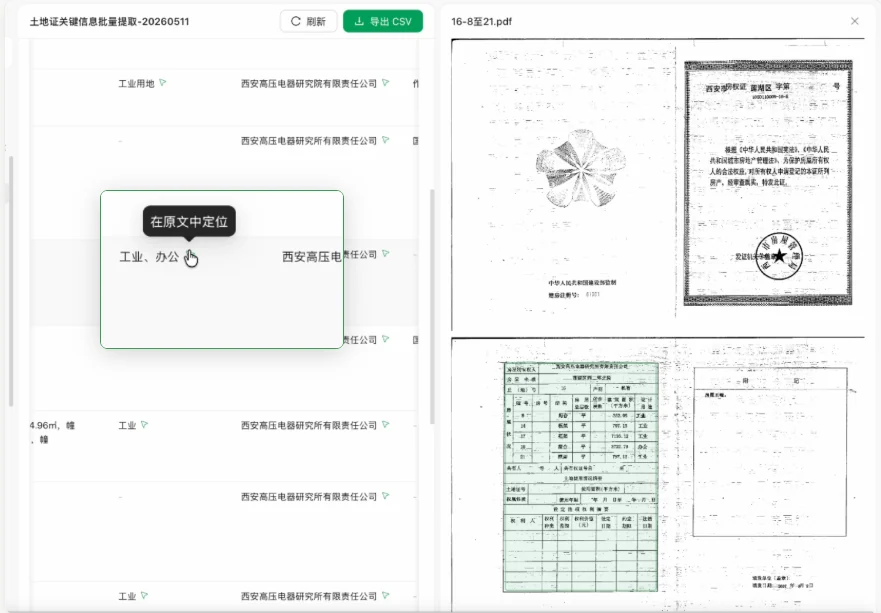
When a task involves many similarly formatted working papers (bank statements, land and property certificates, IP screenshots, confirmation letters), Andoo extracts in bulk and compiles the scattered content into a structured table you can edit and export.
- Choose the materials and key information to organise, for example the bank accounts, balances and confirmation dates in this round of confirmations.
- Andoo extracts the fields from the relevant working papers and compiles them into a table.
- Click the trace marker next to a field to jump back to the source file.
- View and edit the results online, or export them as CSV to keep working.
Filing and request lists
Starting from the client's raw materials and the due diligence request list, Andoo files documents to the list's structure: classifying, renaming and indexing them, checking each item for gaps, and producing a supplementary request list.
Related article (in Chinese): Andoo: organise transactional working papers in one click
Corporate history review
Andoo gathers registration records, capital verification reports, share transfer agreements, articles of association and officer appointments, writes the corporate history chapter on a timeline, lists risks and open items, and exports to Word in one click.
Related article (in Chinese): Andoo: map an IPO company's corporate history in one click